Built for facade & cladding subcontractors
Built for subbies. Not builders!
Run the whole business in one place, with AI built in. Know what each job is really making you.
Built by an estimator, and used on his own jobs first
Subino wasn’t designed in a boardroom. It came out of years of pricing façade, cladding and carpentry packages in Australia — and out of re-typing the same numbers into a budget tracker, a claim and a spreadsheet nobody trusted by the end of the job. It has been running that business’s own work ever since.
- 34
- jobs priced
- $3.6M
- of work priced through it
- 49
- quote revisions on record
- 146
- follow-ups chased
Why not the big platforms
You’ve got the software. And the spreadsheet beside it.
Procore and Buildertrend are good software — for head contractors. As a subbie you can set up your own jobs and your own cost codes in them, and that part works fine.
The problem is what they don’t cover: pricing off your own rates, committed cost by code, progress claims, forecast margin. So you build the missing half in an Excel template, and now you’re running two systems and squaring them up by hand every week.
Subino was built for subcontractors from the start. The half you were doing in Excel is the product.
One system. No spreadsheet on the side.
Procore · Buildertrend
Software, plus your spreadsheet
- Your own jobs and cost codes — that part works
- The estimating and claim detail still lives in Excel
- Two places to keep in step, reconciled by hand
Subino
Just the software
- Priced off your own rates, in your own cost codes
- Committed cost, claims and forecast margin built in
- Nothing left over for a spreadsheet
The old way
Three things a spreadsheet costs you every week
None of them appear on an invoice. All of them come out of your margin.
The old way
Double entry.
You price the job. Then you type the same numbers into a budget tracker. Then into a claim. Every re-type is another chance to be wrong.
The old way
Missed follow-ups.
A variation to chase, a price to confirm, a builder to ring back. It's in your head or on a docket, and four days later it's still not done.
The old way
Lost hours.
Not spent pricing work or running the crew. Spent on admin a system should have done while you were driving.
See it working
One job, end to end, in a minute
The board, the follow-up that writes itself, the cost sheet — and what happens to those numbers the day you win the job.
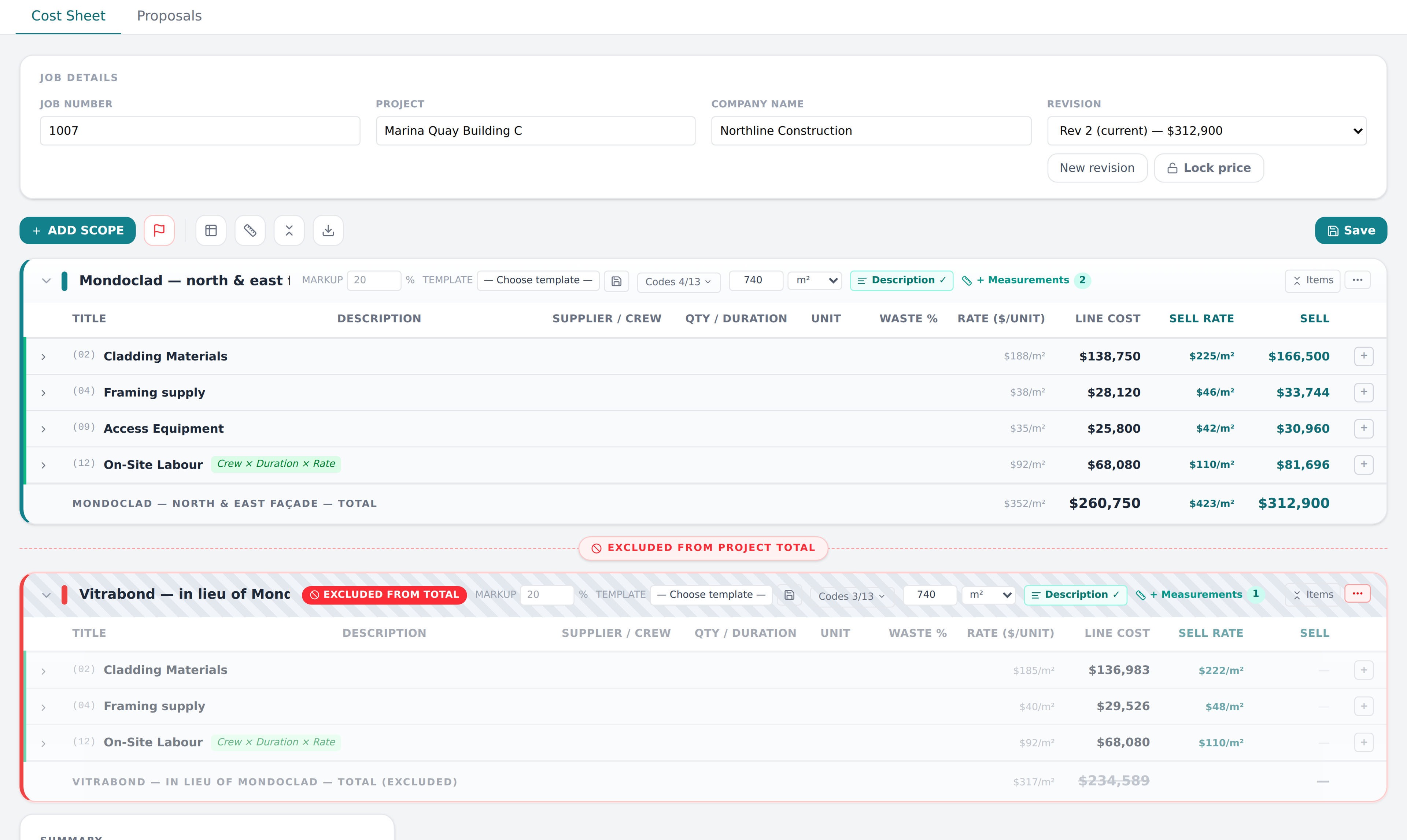
Price it once
The estimate feeds the whole job
Enter a scope once. It becomes the programme, the claim, the budget and the labour target — without you typing it again anywhere.
Estimate — 1007 · Marina Quay Building C
Cost sheet
| Description | Qty | Rate | Amount |
|---|---|---|---|
| 01 · Cladding MaterialsAlpolic NC panels | 740 m² | $187.50 | $138,750 |
| 02 · Framing supplyTop hats & brackets | 740 m² | $38.00 | $28,120 |
| 07 · Cladding LabourInstall — cladding crew | 740 m² | $92.00 | $68,080 |
| 08 · AccessBoom + scissor hire | 12 wk | $2,150.00 | $25,800 |
Priced scopes
Entered once. Flows everywhere ↓
Schedule
Claims
Budget
Labour
Zero double entry
Built-in AI
Talk to it. It does the admin.
The follow-up you meant to do in the ute, and the invoice sitting in your inbox. Two jobs you should never have been doing by hand.
Quick follow-up
Tap the mic and just talk.
“Kingsway job needs a variation — Sofia needs to work on it next week.” Subino finds the job, writes the comment, sets the next step and assigns it to Sofia with a date. Nothing is saved until you confirm it.
Bills read by AI
Drop the invoice in. It fills itself out.
Supplier, invoice number, amount and due date come back filled in and matched to the cost code — linked to the purchase order so nothing gets counted twice.
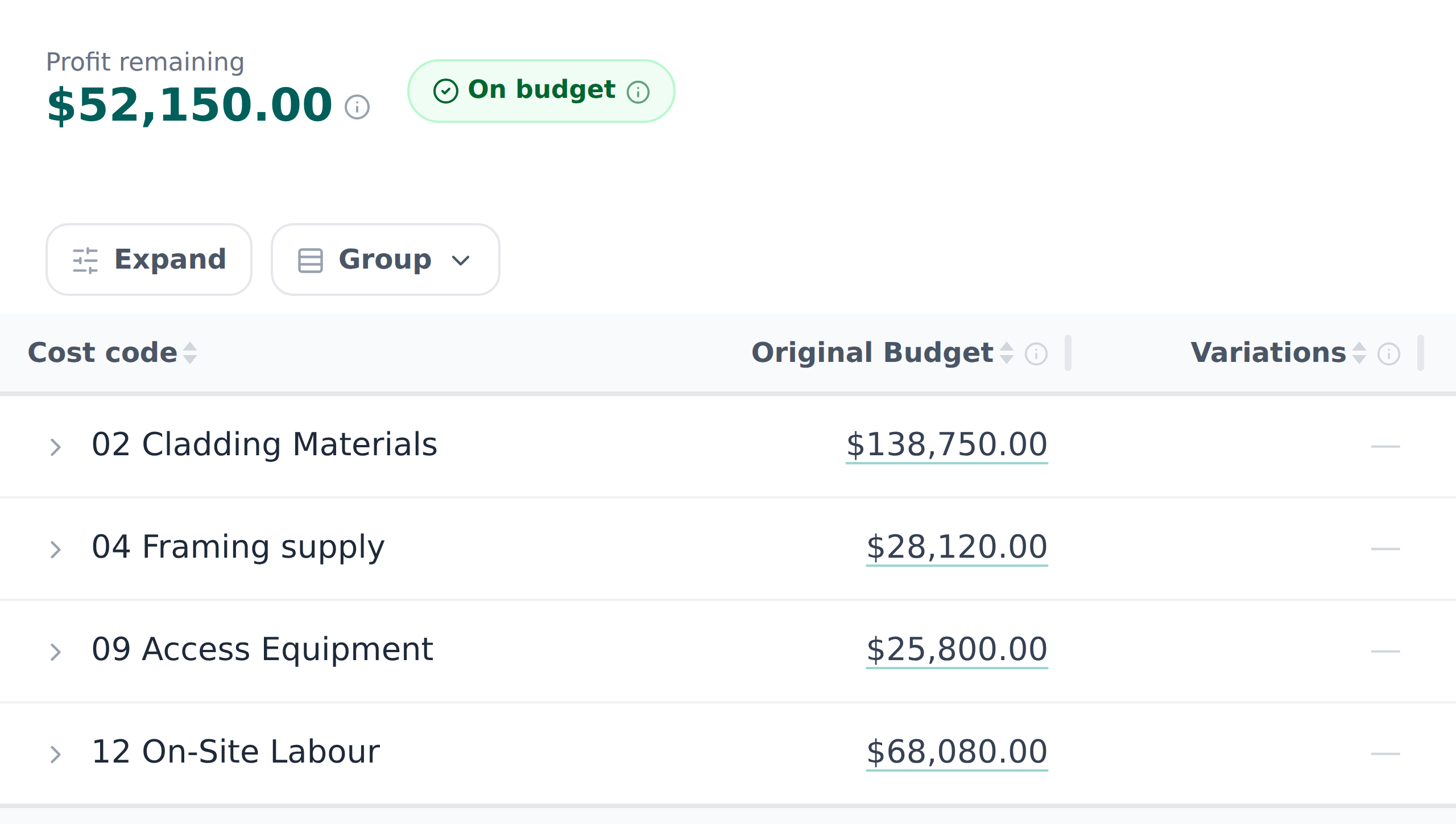
Cost control
See the final margin before the job is finished
Budget → Committed → Actual → Forecast, per cost code. Variations tracked against the contract. When something slips, you know while you can still do something about it.
Why Subino
From first takeoff to final claim, one connected system
The number you quoted becomes the budget you track. No drift, no surprises at the end of the job — and if you'd rather see that than read it, there's a real job on the site with every revision still on it.
The cost sheet
Labour, material, subbie and hire rates under your own cost codes, with waste, preliminaries and margin applied across the lot. Type a formula in a quantity cell and it works — quantities follow the scope, so changing one number moves everything built on it.
Awarded → the budget is already there
Winning the job seeds its budget from the winning revision, per cost code, in one click. This is the re-typing that used to take an afternoon and quietly introduce the error you would find in month three.
Forecast final cost, while you can still act
Budget → Committed → Actual → Forecast on every cost code, with variations against the contract. You find out a code is sliding in the week it happens, not when the job closes out and the number is already spent.
Progress claims against the contract
Claim by percentage complete against the same scopes and cost codes you priced, with the split a builder expects to see: original contract sum, approved variations, contract sum to date. The schedule of values is frozen when you claim, so last month's claim stays what it was.
Moving from Buildertrend or Excel? Bring your jobs with you.
Import your existing jobs and budgets rather than starting from zero — import from Excel, with Buildertrend migration assistance when you switch.
See Subino on your own numbers
Book a demo and walk through your estimating and job costing workflow with us — bring a live job and see the difference.
No obligation, no card — thirty minutes on a job of your own.